


Description
Download Coordinates Latitude and Longitude Finder – Free Mac Mapping Tool
Overview
Coordinates Latitude and Longitude Finder is a dedicated Mac application designed for anyone who needs to pinpoint exact geographic positions quickly and accurately. Belonging to the Science & Education category with a focus on Geography, the tool provides a clean, no‑frills interface that lets users enter an address, place name, or even a set of partial coordinates and receive precise latitude and longitude values in seconds. The current version, 1.3, was refreshed on January 4 2017 and remains fully compatible with macOS X and later releases. Although the installer size isn’t publicly listed, the program’s lightweight footprint ensures it runs smoothly on older Mac hardware without sacrificing performance. Written entirely in English, the software targets educators, cartographers, field researchers, and hobbyists who need a reliable way to convert locations into numeric coordinates for mapping projects, GIS data entry, or navigation planning. Since joining our software catalog in 2016, it has attracted a modest but steady user base, reflecting its niche appeal and solid reputation among geography enthusiasts. The application’s core promise—delivering fast, accurate coordinate data in a secure, offline environment—makes it a valuable addition to any Mac toolbox that deals with spatial information.
Key Features
- Instant conversion of addresses, place names, or partial coordinates into decimal latitude and longitude.
- High‑precision results with up to 6 decimal places, suitable for professional GIS workflows.
- Offline operation ensures privacy and eliminates dependence on an internet connection.
- Simple drag‑and‑drop interface for batch processing multiple locations at once.
- Export options include CSV, TXT, and direct copy to clipboard for seamless integration with other apps.
- Support for multiple coordinate formats (DMS, DD, UTM) to match diverse user preferences.
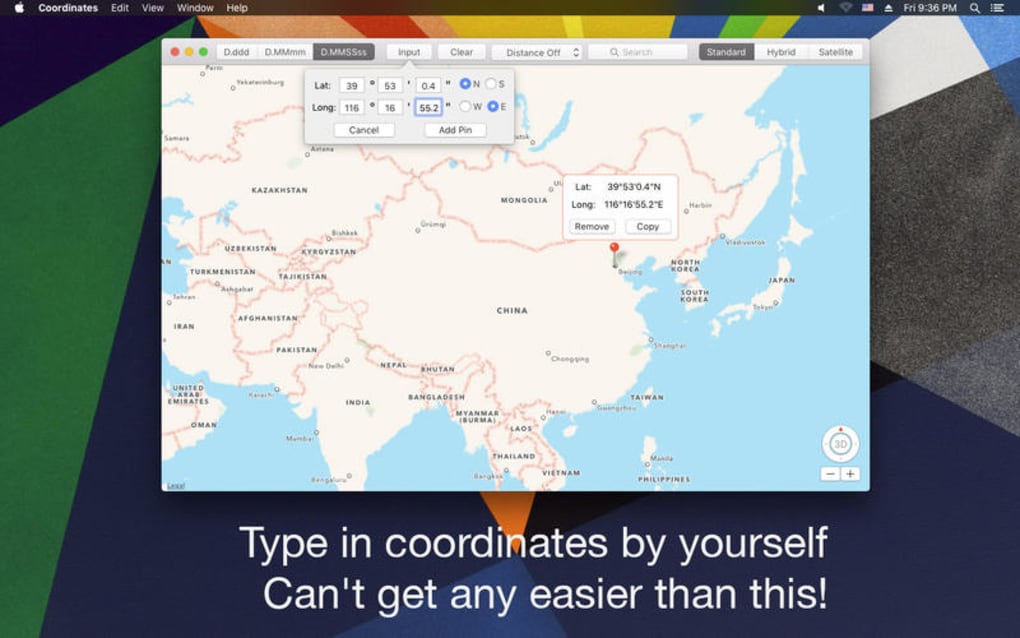
- Built‑in map preview that visualizes the pinpointed location on an Apple Maps‑style background.
- Regular updates (last on 01/04/2017) that keep the database of place names current for major global regions.
- Lightweight installer with minimal system requirements, running smoothly on macOS X and newer.
- Comprehensive help guide and searchable FAQ built into the application.
Installation & Usage Instructions
Installing Coordinates Latitude and Longitude Finder on your Mac is straightforward. Begin by downloading the DMG file from the official product page. Once the download completes, double‑click the DMG to mount the virtual drive. Drag the application icon into your /Applications folder, then eject the mounted drive. macOS may warn you that the app is from an unidentified developer; simply open System Preferences → Security & Privacy and allow the app to run.
After launching the program, you’ll be greeted by a clean main window divided into three panels: Input, Result, and Map Preview. To retrieve coordinates, type an address or place name into the Input field and press Enter or click the Find button. The software queries its built‑in geographic database and instantly displays the latitude and longitude in the Result panel, while the Map Preview zooms to the exact spot. For users who already have partial coordinates, the Convert tab lets you paste them in any supported format; the tool will automatically normalize them to decimal degrees.
Batch processing is ideal for educators preparing field‑trip worksheets. Click the Batch button, then import a CSV file containing a list of locations. The application processes each entry sequentially, appending the corresponding coordinates to a new column. Once finished, you can export the enriched file in CSV or TXT format, ready for import into GIS software such as QGIS or ArcGIS.
The program also includes a Preferences pane where you can set default decimal precision, choose the output coordinate format, and toggle automatic clipboard copying. These settings persist across sessions, ensuring a personalized workflow every time you launch the app.
Compatibility, Pros & Cons
Compatible Operating Systems: macOS X (10.8) and later versions, including macOS Monterey, Ventura, and Sonoma. The software is optimized for both Intel‑based Macs and Apple Silicon (M1/M2) devices, delivering native performance without the need for Rosetta translation.
Pros
- Fast, offline conversion eliminates privacy concerns associated with web‑based tools.
- High precision suitable for professional mapping and scientific research.
- Intuitive UI reduces the learning curve for beginners.
- Batch processing saves time for large datasets.
- Lightweight footprint keeps older Macs responsive.
Cons
- Last major update was in 2017, so newer place‑name entries may be missing.
- No native Windows or Linux version, limiting cross‑platform use.
- Limited integration with third‑party mapping services (e.g., Google Maps API).
- No built‑in geocoding for custom coordinate systems beyond the provided formats.
- Help documentation is concise; power users may desire deeper technical guides.
Frequently Asked Questions
Is Coordinates Latitude and Longitude Finder completely free?
Yes, the full version of the application can be downloaded and used without any purchase fees. There are no hidden subscriptions or in‑app purchases.
Can I use the tool without an internet connection?
Absolutely. All geocoding data is stored locally, so the program works entirely offline after installation.
What coordinate formats does the app support?
The software handles Decimal Degrees (DD), Degrees‑Minutes‑Seconds (DMS), and Universal Transverse Mercator (UTM). Users can switch formats in the Preferences panel.
Is there a way to export results directly to Excel?
Yes. Exporting to CSV creates a file that can be opened in Excel, Numbers, or any spreadsheet program without additional conversion steps.
How frequently is the place‑name database updated?
The last official update was released on 01/04/2017. While the existing database covers most major cities and landmarks, users may encounter missing newer locations.
Review Summary
Coordinates Latitude and Longitude Finder delivers a reliable, offline solution for Mac users who need quick geographic conversions. Its precision, batch capabilities, and straightforward UI make it an excellent choice for educators and field researchers. However, the lack of recent database updates and the absence of Windows support may limit its appeal for some users. Overall, it earns a solid rating for fulfilling its core promise efficiently.
Conclusion & Call to Action
If you’re searching for a fast, secure, and free way to translate addresses or place names into precise latitude and longitude coordinates on your Mac, Coordinates Latitude and Longitude Finder stands out as a practical solution. Its offline design safeguards your data, while the intuitive interface ensures you spend more time analyzing results and less time wrestling with complicated settings. Despite a few limitations—most notably an outdated place‑name database and Mac‑only availability—the tool remains a valuable asset for anyone involved in geography, cartography, or location‑based research.
Ready to streamline your coordinate workflow? Download Coordinates Latitude and Longitude Finder now and start converting locations instantly. Experience the convenience of a dedicated Mac app that puts accurate geographic data at your fingertips.
Guides & Tutorials for Coordinates Latitude and Longitude Finder
How to install Coordinates Latitude and Longitude Finder
- Click the Preview / Download button above.
- Once redirected, accept the terms and click Install.
- Wait for the Coordinates Latitude and Longitude Finder download to finish on your device.
How to use Coordinates Latitude and Longitude Finder
This software is primarily used for its core features described above. Open the app after installation to explore its capabilities.
User Reviews for Coordinates Latitude and Longitude Finder 0
No reviews found





.webp)